


Shukhee
4.413.00 Reviews
App Specs
- Version
- 2.2.4
- Updated On
- License
- Free
- Downloads
- 1,000,000+
- Developer
- GRAMEEN HEALTHTECH LIMITED
- Categories
- Medical
- Platform
- Android
Screenshots
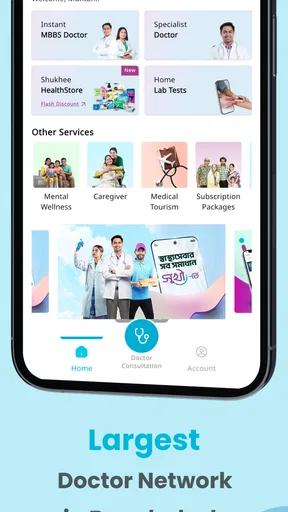
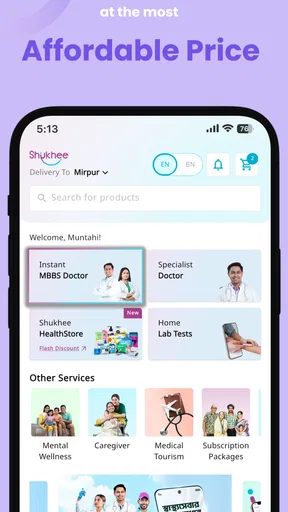
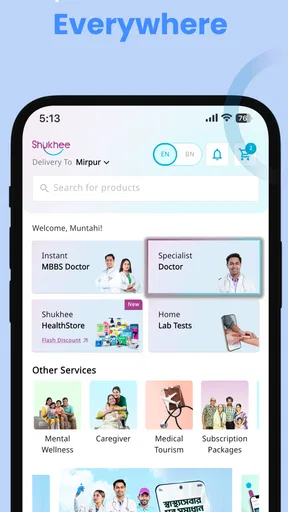
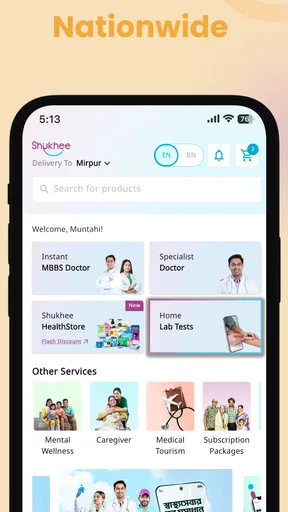
 Analysis by AppCompare
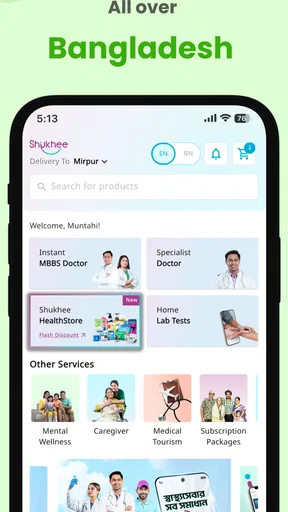
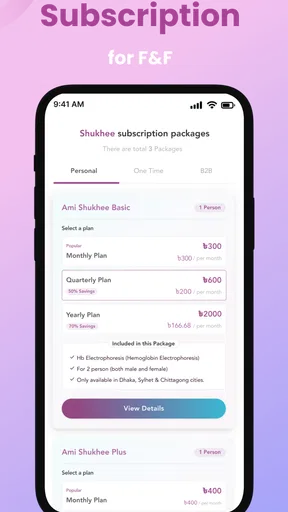
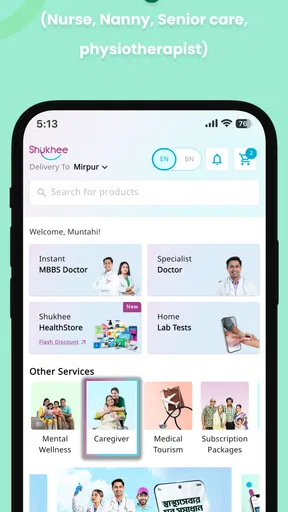
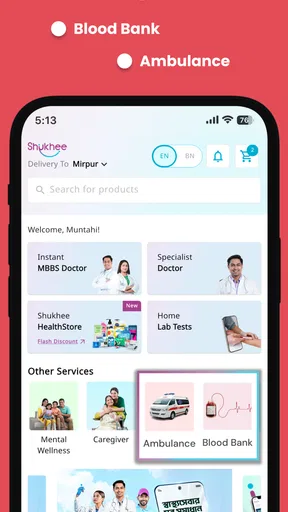
When a health app is used by one person, the main question is usually simple: does it help me find care without adding stress? On a shared phone, the question becomes more complicated. A family member may need help booking or understanding a health service, while another person may be the one holding the device. That is the situation in which I found Shukhee most interesting: it is a free medical app from GRAMEEN HEALTHTECH LIMITED that aims to bring several parts of digital healthcare into one place.
I approached it less like a replacement for a doctor and more like a practical front door to health-related services. The app is presented as an on-demand, broad digital healthcare platform, and that positioning matters. It is trying to reduce the need to jump between separate tools for different healthcare tasks. My overall impression is positive, especially for people who want a convenient starting point, but I would still use it with sensible boundaries. Convenience is valuable in healthcare, yet it should not be confused with emergency treatment, a complete medical record, or a substitute for professional judgment.
How Shukhee fits into everyday household healthcare
When I think about Shukhee in a household, I see its value less as a shared medical file and more as a practical place to begin coordinating care. Before a family member uses the phone, I’d agree on whose needs the task concerns and let that person confirm the details. That simple routine makes the app easier to use responsibly, and it leads naturally to the first question a new user usually has: what should I expect when opening it?
A realistic shared-device situation
Imagine a household where one person owns the phone but several people occasionally need health support. A parent may ask for help checking a service, a partner may need to arrange a consultation, or an older relative may be more comfortable explaining the problem aloud while someone else handles the screen. In that setting, a single health app can be useful because it gives the household a common place to begin instead of forcing everyone to remember several different services.
That does not mean I would treat the phone as a communal medical file. I would open Shukhee for the specific task, help the family member complete it, and then make sure the next person knows whose information is being entered. This small habit is more important than it sounds. Health details are personal, and shared-device convenience can easily blur account boundaries if users rush through forms or leave a session open.
The app’s broad healthcare focus makes it more suitable for coordination than for one narrow medical routine. Someone who only wants a medication alarm, a fitness tracker, or a symptom diary may find a specialist app more focused. Shukhee makes more sense when the goal is to reach digital health support from one general-purpose place.
What I would do before handing over the phone
For shared use, I recommend deciding in advance who the current user is. I would not let several people enter information under one person’s profile simply because it is faster. If the app asks for personal details, the person receiving care should be the one represented by those details. A helper can operate the phone, but the information should still belong to the correct individual.
Worth Reading Before You Choose

EA SPORTS FC Mobile 26 Is a Bigger Football Game, but It Takes Time

Flipboard Shows What News Apps Must Do Beyond the Feed

Switching to Android Auto Means Rethinking Your Driving Routine

Google Calendar Makes a Crowded Week Easier to Manage

Ludo King Makes the Most of the Minutes Between Plans

Baby Panda World Brings Quick Play to Modern Phones, but Its Game Library Feels Busy
I would also avoid treating a family member’s account as a permanent household account. That creates confusion later, particularly when someone needs to remember which details were entered, which request was made, or which communication belongs to which person. The cleaner approach is task-based assistance: open the app, complete the relevant step for the right person, review what was submitted, and close the session when finished.
This is one of the app’s practical trade-offs. A digital healthcare platform can make access easier for people who are not confident with technology, but the same convenience can encourage one person to manage everything for everyone. Shukhee works best when the helper supports access without silently taking ownership of another person’s health decisions.
Setup is simple in principle, but attention still matters
Shukhee is free to use, which removes an obvious barrier for someone who wants to try a digital healthcare service before committing money. It is rated for Everyone, and the app supports devices running Android 7.0 or later. Those details make it approachable for households with older Android phones, although an age rating should never be interpreted as proof that every medical interaction is appropriate for a child to handle alone.
The current version is 2.2.4. I would still check that the app is updated before relying on it for an important healthcare task. Updates can affect the way screens behave, and a household that shares one phone may not notice whether the application has changed since the last use. I would also keep the device’s general security in mind, including a screen lock and care around notifications that might reveal sensitive information to whoever happens to see the phone.
During setup, my advice is to slow down at the points where identity, contact information, or symptoms are involved. A rushed helper may type their own details instead of the patient’s, especially when the app is being used on someone else’s behalf. That is not a criticism unique to Shukhee; it is the main human risk of shared healthcare technology. The app can organize access, but it cannot decide whether the person holding the device has entered the right information.
Coordination is where the platform has the most value
I see the strongest use case in coordination. A household often does not need another place to read general health advice; it needs a way to turn a vague concern into a next step. A family member can help gather the basic facts, open the relevant part of Shukhee, and keep track of what needs to happen afterward. That workflow is more useful than simply installing the app and expecting it to solve a health problem automatically.
For example, if an older relative is uncomfortable navigating a phone, I would sit with them, let them describe the issue in their own words, and use the app only to support the agreed task. I would repeat back important details before confirming anything. If the process leads to a consultation or another form of care, I would write down the time and instructions separately rather than assuming that the app alone will be remembered later.
A second useful habit is separating coordination from diagnosis. Shukhee may help a user reach digital healthcare services, but I would not use a general platform to make a serious decision based only on a brief description of symptoms. If the situation appears urgent, severe, or rapidly worsening, I would contact local emergency services or seek immediate in-person care instead of waiting for an app-based interaction.
This distinction also answers an important question: is Shukhee suitable for routine healthcare? In my view, it is most appropriate as a convenient starting point for ordinary, non-emergency needs and household organization. It is not the tool I would depend on for an emergency, a complex condition requiring continuous specialist oversight, or a situation where a physical examination is clearly necessary.
Age, trust, and the limits of a family helper
The Everyone content rating makes the app feel broadly accessible, but healthcare access still needs adult judgment. A child may be able to look at an app interface, yet that does not mean the child should create an account, describe symptoms without supervision, or make choices about treatment. For younger users, I would keep a parent or responsible adult involved from the beginning.
Older users may have the opposite challenge: they may understand their health needs perfectly well but find digital steps tiring or confusing. In that case, the best role for a family member is a transparent assistant. I would explain each screen, ask for permission before entering information, and let the older person confirm what is being submitted. This preserves trust and reduces the chance that a well-meaning helper changes something important without noticing.
Trust also applies between adults. A shared phone should not become an excuse to browse another person’s health activity. If several household members use the same device, I would treat privacy as part of the setup rather than an afterthought. Closing the app, checking who is signed in, and avoiding casual screenshots are simple practices that make shared use more respectful.
One limitation is that a broad platform cannot automatically resolve family relationships. I would not assume that the app provides household profiles, parental supervision, or a special caregiver mode unless those options are clearly visible in the current experience. Instead, I would build the family workflow around consent and clear communication. That may feel less convenient than a dedicated family-management system, but it avoids inventing a structure the app may not provide.
How it compares with the usual alternatives
Compared with visiting a clinic directly, Shukhee offers a more convenient first step for users who want to explore digital care from home. That can be especially helpful when travel is inconvenient or when a family member needs assistance organizing the next action. The trade-off is that digital access cannot reproduce every part of an in-person visit, particularly examination, physical measurements, and the context a clinician gains by seeing the patient directly.
Compared with a single-purpose medical app, Shukhee’s advantage is breadth. A medication reminder may be better at reminders, a symptom journal may be better at long-term tracking, and a hospital’s own application may be better for that hospital’s established patients. I would choose Shukhee when I want a general healthcare entry point rather than one specialized function. I would choose a narrower alternative when I already know exactly which task needs to be handled and want the deepest possible tool for it.
Compared with searching the web, a dedicated healthcare app can feel more structured and less overwhelming. Search results often mix reliable medical guidance with content that is difficult to evaluate. Shukhee does not remove the need for judgment, but it gives the user a more purposeful route than opening many unrelated pages. I still would not use any digital platform as the final authority for a serious medical decision.
What the numbers suggest, and what they do not
Shukhee has reached more than a million installs and holds a 4.4 average rating from around 1,200 ratings. Those figures suggest that the app has found a substantial audience and that many users have considered the experience worthwhile. They are useful signals when deciding whether an app is worth trying, but they do not guarantee that every healthcare workflow will suit every household.
The app has 13 written reviews shown alongside those broader rating signals. I would read that combination carefully: an average can indicate general satisfaction, while a small set of detailed comments may reveal the kinds of situations users actually encounter. In healthcare, personal context matters so much that I would test the app with a low-pressure task before depending on it for something time-sensitive.
Its free price is another reason to try it without much commitment. Still, “free” does not remove the cost of attention. Users spend time entering information, checking details, and coordinating with other people. If the app does not fit the household’s routine, a direct clinic, a trusted local provider, or a more specialized tool may ultimately be more efficient.
Small workflow choices that improve the experience
My first practical tip is to prepare the information needed for the task before opening the app. On a shared phone, this avoids repeated handovers and reduces the chance of entering hurried, incomplete details. I would keep the patient nearby, confirm names and contact information aloud, and review the final screen before moving on.
My second tip is to use one conversation as the source of truth. If a family member is helping, they should agree with the patient on what the request is for and what outcome is expected. This prevents a common problem with digital care: one person thinks they are arranging a consultation, while another thinks they are only asking for general information.
My third tip is to treat every digital interaction as part of a larger care plan. After using Shukhee, I would note any follow-up action in a separate calendar or notebook, especially if another family member must take over. This is not because the app is inadequate; it is because household coordination often fails between steps, not during them.
Finally, I would keep expectations realistic. A digital platform can shorten the distance between a concern and a healthcare service, but it cannot guarantee that the first route will answer every question. If the issue becomes more complicated, I would move to direct professional care rather than repeatedly trying different app screens.
Who should use it, and who should look elsewhere
I would recommend Shukhee to people who want a free, general digital healthcare starting point and to households where one person sometimes helps another navigate care. It is particularly appealing when convenience, remote coordination, and a single health-focused app matter more than having a highly specialized tool for one narrow job.
I would be more cautious about recommending it to someone who needs emergency assistance, detailed long-term disease management, or a guaranteed connection to a particular clinic or specialist. I would also look elsewhere if my main need were only reminders, exercise tracking, or private symptom journaling. A focused application may provide a clearer experience in those cases.
For children and dependent adults, I would use it with supervision and explicit consent. The Everyone rating supports broad accessibility, but it does not replace a caregiver’s responsibility to decide what the user should see, enter, or act on. For independent adults, I would let personal preference guide the choice, while still keeping shared-device privacy in mind.
My household verdict
After looking at Shukhee through the lens of shared use, I see a sensible role for it: it can serve as a common doorway to digital healthcare without demanding a separate paid tool. Its broad purpose, free access, and compatibility with older Android devices make it easy to consider for everyday household coordination. The developer, GRAMEEN HEALTHTECH LIMITED, has positioned it as a healthcare platform rather than a narrow utility, and that gives it wider potential use.
My recommendation comes with a clear condition: use it deliberately. Keep each person’s information attached to the correct user, supervise children and vulnerable relatives, confirm what is being submitted, and do not delay urgent care while trying to solve a serious problem through an app. Those habits matter as much as the interface.
For me, Shukhee is most convincing when it reduces friction between a household concern and the next sensible healthcare step. It is not a replacement for every medical service, and it may not be the best choice for a highly specialized need. But for families and individuals looking for a free, accessible digital health starting point, I think it is worth trying with realistic expectations and respectful account boundaries.
If I were recommending it to a friend, I would say this: install it when you want one place to begin, especially if you sometimes help someone else use a phone for healthcare. Test it with a routine task, learn how the workflow fits your household, and keep direct medical care as the priority whenever the situation calls for it.
Pros
- Simple interface makes everyday use easy for new users.
- Useful tools are organized for quick access.
- Lightweight design helps it run smoothly on many devices.
- Notifications can keep important updates visible.
- Convenient mobile access reduces the need for separate services.
Cons
- Some features may require account registration or personal details.
- Performance can vary on older phones or slower connections.
- Notification settings may need manual adjustment to avoid interruptions.
- The app’s usefulness depends on the services available in your area.
- Privacy information should be reviewed before sharing sensitive data.
FAQs for Shukhee
What is Shukhee and what can I use it for?
Shukhee is a mobile application focused on helping users access digital services and information from one place. Depending on the version and region, it may provide tools for managing personal activities, viewing available content, communicating with services, or completing everyday tasks. Before downloading, check the app’s current description and supported features, since availability can differ between Android and iOS.
Is Shukhee free to download and use?
Shukhee may be available to download at no initial cost, but some features or services could require payment, registration, a subscription, or additional charges. The exact pricing depends on the country, platform, and services selected inside the app. We recommend reviewing the store listing, in-app payment information, and terms of service before creating an account or confirming any transaction.
Does Shukhee require an account or personal information?
Some functions in Shukhee may be accessible without signing in, while others can require an account to save preferences, verify identity, access personalized services, or synchronize information across devices. During registration, the app may request details such as an email address, phone number, or other information. Read the privacy policy carefully and provide only the data necessary for the features you intend to use.
Is Shukhee safe and trustworthy to install?
For safer installation, download Shukhee only from the official Google Play Store or Apple App Store, and confirm that the developer name matches the legitimate publisher. Review the permissions requested and avoid unofficial APK files or modified versions. As with any application, security also depends on keeping your device updated, using a strong password, and checking how your personal information is collected and shared.
What should I do if Shukhee does not work properly?
If Shukhee crashes, loads slowly, or a feature does not respond, first check your internet connection and install any available app updates. Restarting the application or device can also resolve temporary problems. If the issue continues, review the app’s help or support section and contact the official developer. Avoid downloading unofficial fixes, especially if the app handles personal information or payments.


